Drive: overview
Drive is the Mative Cloud Things Connector module for people who own a single vehicle with a Mative GPS tracker. You can see where your vehicle is, whether it is moving or parked, the trips of the day and the alarms. From the same pages you check the deadlines and lock the engine.
Drive is designed for the smartphone. It opens in the Mative Cloud TC - Mobile app and in the browser, on phone or computer, and always shows only your vehicle.
How to open it
- Get your Account ID: contact us and we will enable access for your vehicle.
- Drive opens as your home page, also in the Mative Cloud TC - Mobile app: the first screen is Il mio veicolo (my vehicle).
The module interface is in Italian. In this guide, labels are written as they appear on screen, followed by their English meaning in parentheses.
Pages
| Page | What you do there |
|---|---|
| Home (Il mio veicolo) | Status, position, engine lock, today's trips and a tile for each area |
| Trips (Percorsi) | Trips of a day or week and their replay |
| Alarms, deadlines and device | Alarms, deadlines, vehicle data, tracker status and the live map |
| Statistics (Statistiche) | Km, usage, alarms and battery over time |
Tab bar
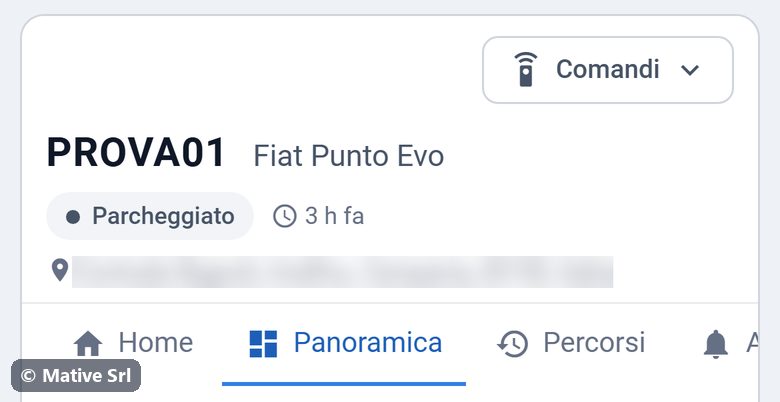
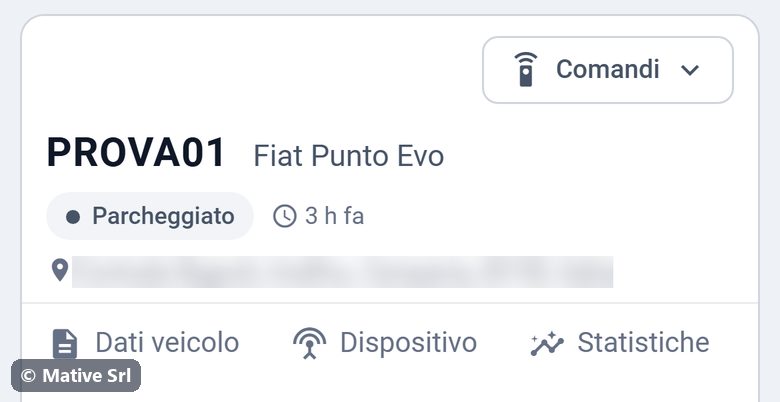
Outside the home, a bar of tabs at the top of the page takes you to the other pages. The tabs are Home, Panoramica (overview), Percorsi (trips), Allarmi (alarms), Scadenze (deadlines), Dati veicolo (vehicle data), Dispositivo (device) and Statistiche (statistics). On a phone the bar does not fit the screen: swipe it sideways to reach the last tabs.
Vehicle status
| Status | Meaning |
|---|---|
| In marcia (moving) | Ignition on and speed above 3 km/h |
| Acceso, fermo (on, stopped) | Ignition on, vehicle not moving |
| Parcheggiato (parked) | Ignition off. The home also shows since when. |
| Non aggiornato (not updated) | No data from the tracker for more than 12 hours |